What is Virtualizor? Complete Guide to the Virtualizor VPS Control Panel – VirtualizorVPS.com
What is Virtualizor? Complete Guide to the Virtualizor VPS Control Panel in 2026
What Is Virtualizor and How Does This VPS Control Panel Work?
In today’s VPS hosting industry, performance, automation, and reliability are no longer optional — they are essential. This is where Virtualizor stands out as one of the most powerful and flexible VPS control panels available for hosting providers, data centers, and advanced system administrators.
Virtualizor is a web-based VPS control panel designed to create, manage, sell, and automate Virtual Private Servers across multiple virtualization technologies from a single, centralized interface.
Whether you operate a VPS hosting business, manage infrastructure for clients, or use VPS services professionally, Virtualizor provides the tools required to manage servers efficiently while keeping operations scalable and secure.
If you are wondering what is Virtualizor, it is essentially a modern VPS control panel designed to simplify server provisioning, management, and automation for hosting providers.
This guide explains what is Virtualizor, how it works, and why it is widely used for VPS hosting environments.
What Exactly Is Virtualizor?
What Is Virtualizor Used For in VPS Hosting?
When people ask what is Virtualizor used for, the answer is simple: it helps hosting providers and system administrators automate, manage, and scale VPS infrastructure efficiently from a single control panel.

Virtualizor is a lightweight yet enterprise-grade VPS management platform developed by Softaculous — the company best known for its widely adopted application auto-installer used across millions of servers worldwide.
It acts as a bridge between the underlying hypervisor and both administrators and end users by offering:
- A feature-rich Admin Panel for hosting providers
- A simple and intuitive Client Panel and Virtualizor Demo for VPS customers
- Native integration with WHMCS and billing platforms
- Support for multiple virtualization technologies
Unlike many legacy VPS control panels, Virtualizor is built with modern cloud infrastructure and automation-first hosting in mind.
Why Virtualizor Is Popular Among VPS Providers
1. Performance-Focused Architecture
Virtualizor is designed to be extremely lightweight, ensuring minimal overhead on the host system. VPS performance is therefore driven by hardware resources rather than the control panel itself.
2. Automation and Scalability
From VPS provisioning and suspension to backups, rebuilds, and upgrades, nearly every task can be automated — significantly reducing manual workload for hosting providers.
3. Multi-Virtualization Support
Virtualizor supports a wide range of virtualization technologies, allowing providers to scale and adapt without being locked into a single platform.
Virtualization Technologies Supported by Virtualizor
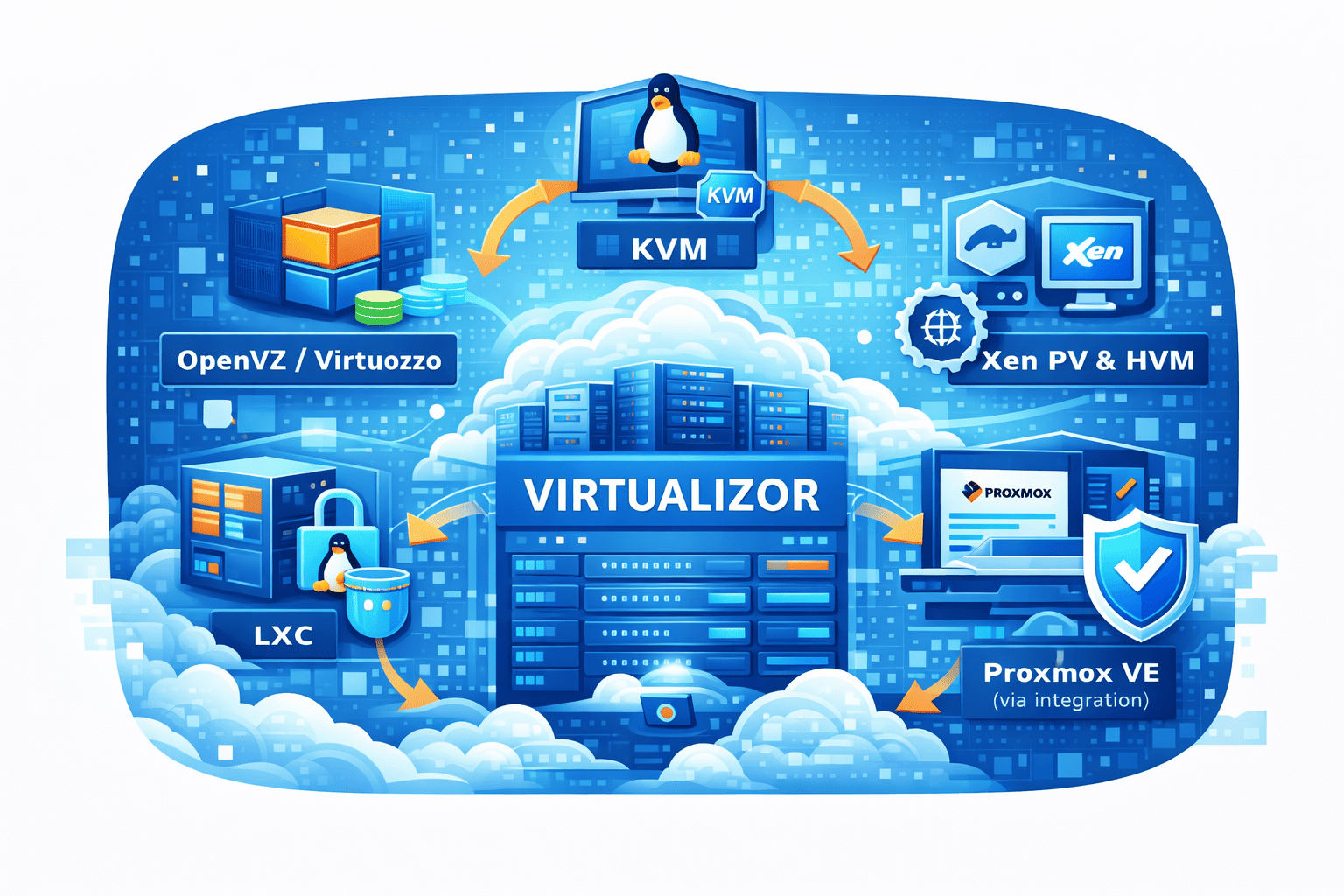
- KVM (Kernel-based Virtual Machine)
- OpenVZ / Virtuozzo
- LXC (Linux Containers)
- Xen (PV and HVM)
- Proxmox VE (via integration)
This flexibility allows hosting providers to offer budget VPS plans, enterprise-grade cloud VPS, and Windows VPS hosting under a single platform.
To understand how virtualization affects performance and isolation, read our detailed guide: How KVM Virtualization Guarantees Performance.
Key Features of the Virtualizor VPS Control Panel
1. One-Click VPS Management
- Start, stop, and reboot VPS
- Instant operating system reinstallation
- Reset root or administrator passwords
- Manage hostname and DNS settings
2. OS Templates and ISO Management
- Linux distributions such as Ubuntu, Debian, AlmaLinux, Rocky Linux
- Windows VPS installation via ISO
- Custom ISO uploads
- Cloud-init compatible images
3. Backup and Snapshot System
- Scheduled automated backups
- Remote backup storage support
- Instant VPS snapshots (KVM)
- One-click restore options
4. Resource Allocation and Limits
- CPU core allocation
- Dedicated RAM limits
- Disk and storage control
- Bandwidth and IOPS restrictions
These controls ensure stable node performance even when running multiple VPS instances.
Explore our Virtualizor VPS Hosting Plans to see this infrastructure in real-world use.
Virtualizor Admin Panel vs Client Panel
Admin Panel (For Hosting Providers)
- Manage nodes and VPS instances
- Control IP pools and networking
- Configure firewall and security rules
- Create and manage users
- Automate hosting operations
Client Panel (For VPS Users)
- Power controls (start, stop, reboot)
- Real-time CPU, RAM, and bandwidth graphs
- Instant OS reinstallation
- HTML5 and VNC console access
The simplicity of the client panel significantly reduces support tickets and improves customer experience.
Security Features in Virtualizor

- Two-factor authentication (2FA)
- Role-based admin permissions
- IP-based access restrictions
- Built-in firewall management
- Secure API authentication
Learn more in our guide on VPS Security Best Practices.
Virtualizor and WHMCS Integration
Virtualizor integrates natively with WHMCS, enabling complete automation of VPS services.
- Automatic VPS provisioning after payment
- Automated suspension and termination
- Seamless plan upgrades and downgrades
- Reduced manual administration
Who Should Use Virtualizor?
- VPS hosting providers
- Cloud hosting startups
- Data centers
- VPS resellers
- Experienced system administrators
Virtualizor vs Other VPS Control Panels
| Feature | Virtualizor | SolusVM | Proxmox |
|---|---|---|---|
| Multi-Virtualization Support | Yes | Limited | No |
| Client Panel | Yes | Yes | No |
| WHMCS Integration | Native | Native | No |
How This Guide Compares to Other Virtualizor Articles
Many articles explain Virtualizor at a surface level. This guide goes deeper by covering both technical and real-world hosting aspects that matter to providers and professional users.
| Feature / Topic | This Guide (VirtualizorVPS.com) | Other Guides (e.g., Cloudzy) |
|---|---|---|
| Basic Virtualizor Overview | ✅ Covered in detail | ✅ Covered |
| Multi-Virtualization Support | ✅ Detailed explanation | ✅ Mentioned |
| Admin vs Client Panel Roles | ✅ Explained with use cases | ⚠️ Brief mention |
| Real-Time Billing & Usage Tracking | ✅ Explained with provider benefits | ⚠️ Mentioned |
| Cluster & Multi-Node Management | ✅ Explained for scaling hosting businesses | ⚠️ Brief overview |
| VNC / HTML5 Console Access | ✅ Explained with troubleshooting scenarios | ⚠️ Mentioned |
| VPS Cloning & Rapid Deployment | ✅ Included with real-world use cases | ❌ Not covered |
| API Automation & Integration | ✅ Covered for advanced workflows | ❌ Not covered |
| Security & EEAT Considerations | ✅ Security + trust explained | ⚠️ Limited |
| Conversion Guidance (Plans & Next Steps) | ✅ Clear, user-focused CTA | ❌ Not included |
Is Virtualizor Right for You?
Virtualizor is designed for flexibility, automation, and scale, but it may not be the perfect fit for every use case. Use the guide below to decide whether Virtualizor aligns with your requirements.
Virtualizor Is a Great Choice If:
- You run or plan to launch a VPS hosting business
- You need automation for provisioning, billing, and lifecycle management
- You want to support multiple virtualization technologies (KVM, OpenVZ, LXC, etc.)
- You require a client-friendly control panel to reduce support overhead
- You plan to scale across multiple VPS nodes
- You integrate VPS services with WHMCS or custom billing systems
Virtualizor May Not Be Ideal If:
- You are managing a single internal server with no customer-facing services
- You prefer a bare-metal hypervisor interface without a client panel
- You do not require billing, automation, or multi-user access
- You are looking for a solution focused purely on internal virtualization rather than VPS hosting
In short, Virtualizor excels in environments where VPS services are sold, automated, and managed at scale. For hosting providers and professional users, it offers the right balance between control, simplicity, and growth potential.
If your goal is to offer or use VPS services professionally, Virtualizor is built specifically for that purpose.
Final Thoughts: Why Virtualizor Continues to Lead
Virtualizor has earned its reputation not through marketing hype, but through consistent performance in real hosting environments.
For hosting providers, it simplifies operations. For VPS users, it delivers control without complexity. For growing businesses, it offers scalability without locking you into a single virtualization platform.
If your goal is to deploy VPS infrastructure that remains flexible, secure, and future-ready, Virtualizor is a platform worth serious consideration.
Understanding what is Virtualizor and how it fits into modern VPS hosting makes it easier to choose the right control panel for long-term growth.
Ready to Experience Virtualizor-Powered VPS Hosting?
Explore reliable VPS hosting built on Virtualizor and experience professionally managed infrastructure:
Whether you are launching your first VPS or scaling an existing infrastructure, Virtualizor-powered hosting gives you control, stability, and room to grow.
Related Posts:
Supported Operating Systems and Templates for OpenVZ & KVM VPS – Complete 2025 Guide | VirtualizorVP...

Welcome to the Official VirtualizorVPS Blog – Your Source for VPS, Cloud, and Virtualization Insight...


One Reply to “What is Virtualizor? Complete Guide to the Virtualizor VPS Control Panel in 2026”